If you're searching for an amortization calculator, you probably want to see one specific thing: how a loan breaks down month by month — how much goes to interest, how much goes to principal, and when it finally gets paid off.
That's a completely reasonable thing to want. And ShouldIRefi.app gives you exactly that.
But here's what sets it apart: most amortization calculators stop there. ShouldIRefi doesn't. The same tool that shows your amortization schedule also lets you compare refinance scenarios, model debt consolidation, run payoff strategies, evaluate loan offers side by side, analyze home equity options, and see how your financial picture changes under any scenario you can think of.
You came for an amortization calculator. You're about to find a lot more.
What an Amortization Calculator Actually Does
Let's start with the basics.
When you take out a loan — a mortgage, a car loan, a personal loan — your lender sets a monthly payment that's calculated to pay off the loan completely by the end of the term. That payment stays the same every month, but what's inside it changes over time.
In the early years, most of your payment goes toward interest. As the balance slowly shrinks, more of each payment shifts toward paying down the principal. This gradual shift is called
amortization.
An amortization calculator lets you see this breakdown. It shows you:
• Your monthly payment amount
• How much of each payment is interest vs. principal
• Your remaining balance after each payment
• How many months until the loan is fully paid off
• The total interest you'll pay over the life of the loan
That last number is often the one that surprises people most. On a $300,000 mortgage at 7% over 30 years, your monthly payment is about $1,996. But by the time you make the final payment, you've paid roughly $418,000 in interest on top of the $300,000 you borrowed. You've paid for your home almost twice over.
Seeing that number clearly is the first step to doing something about it.
How the ShouldIRefi Calculator Works
[Try the ShouldIRefi Calculator →] https://shouldirefi.app/tool/calculator
The ShouldIRefi Calculator is built around your current debt situation. You enter your loan balance, interest rate, and remaining term — and the tool instantly shows you:
• Your current monthly payment
• The full amortization breakdown for your loan as it stands today
• How much total interest you're on track to pay if nothing changes
• Your debt-to-income ratio (DTI) and how it compares to common lender thresholds
• Your loan-to-value ratio (LTV) if you're a homeowner — which determines how much equity you can access
This alone makes it a complete, useful amortization calculator. But that's just the starting point.
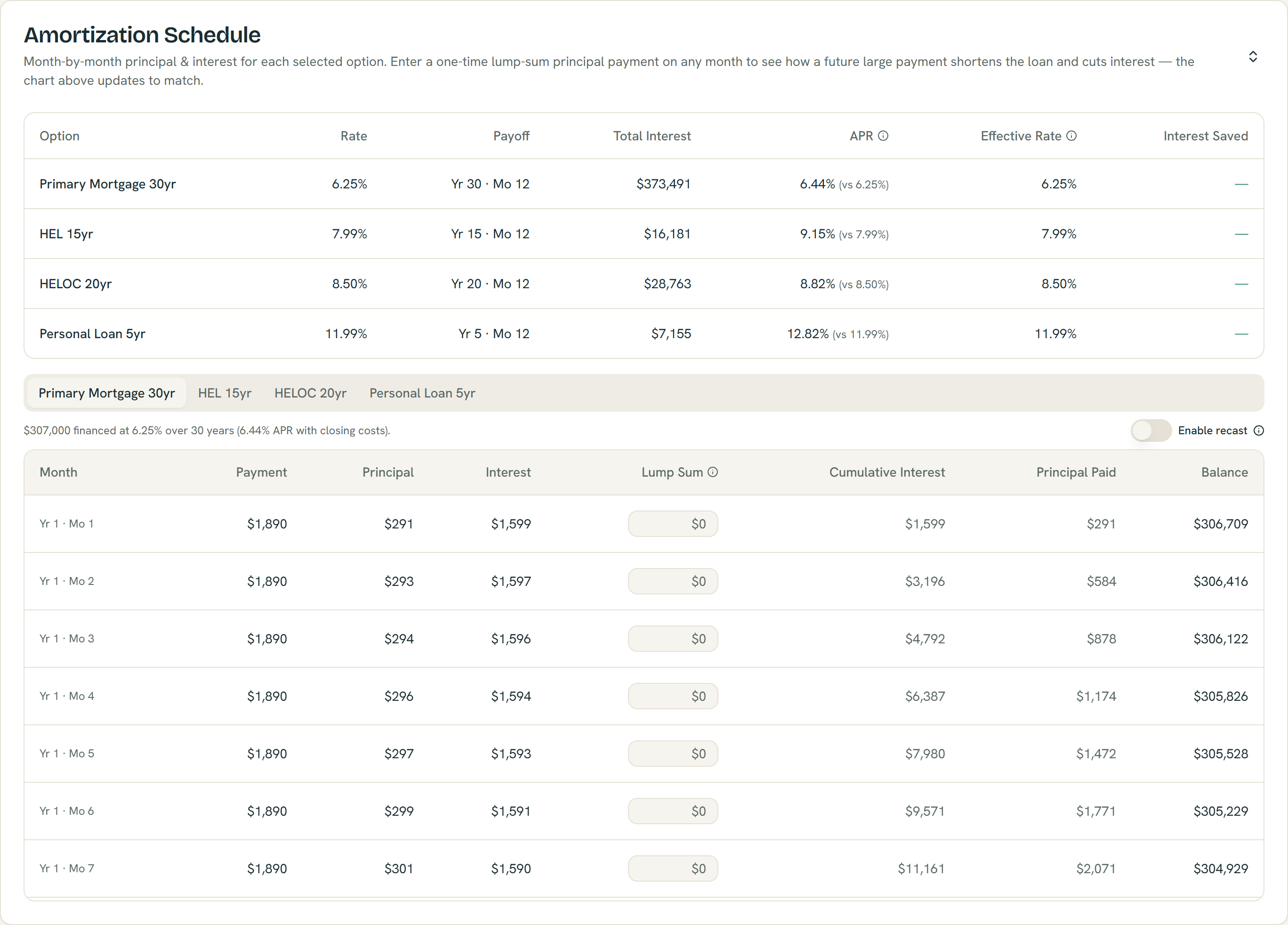
The Amortization Schedule breaks down every payment and lets you model one-time lump sums — with an optional recast — from example inputs; estimates only.
What Makes It Different: Side-by-Side Scenario Modeling
Most amortization calculators show you one scenario — your current loan. ShouldIRefi shows you your current situation alongside up to four alternative scenarios at the same time, so you can see exactly what changes and what doesn't.
Those alternative scenarios can include:
Cash-Out Refinance
What happens if you replace your current mortgage with a new one at a different rate or term? The calculator shows you the new payment, the new amortization schedule, how much interest you'd pay over the life of the new loan, how long until you break even on closing costs, and how much equity you'd have 10, 20, or 30 years from now.
Home Equity Loan (HEL)
A fixed second lien that lets you borrow against your home's equity without replacing your primary mortgage. The calculator models the combined payment on both loans and shows total interest across both.
Home Equity Line of Credit (HELOC)
A revolving line of credit secured by your home. The calculator models both the draw period (interest-only payments) and the repayment phase, and shows how the combined cost compares to your current situation.
Personal Loan
For homeowners and non-homeowners alike. The calculator models a personal loan layered on top of your existing debt and shows how it affects your monthly payment, total interest, and debt-to-income ratio.
Self-Pay / Accelerated Payoff
What if you kept your current loan but made extra payments? The calculator shows how much time and interest you'd save by putting an additional $100, $200, or $500 per month toward principal.
Every scenario is calculated against your baseline so you can see the difference clearly: how much your payment changes, how much interest you save (or spend), when each option pays off, and how much it all costs.
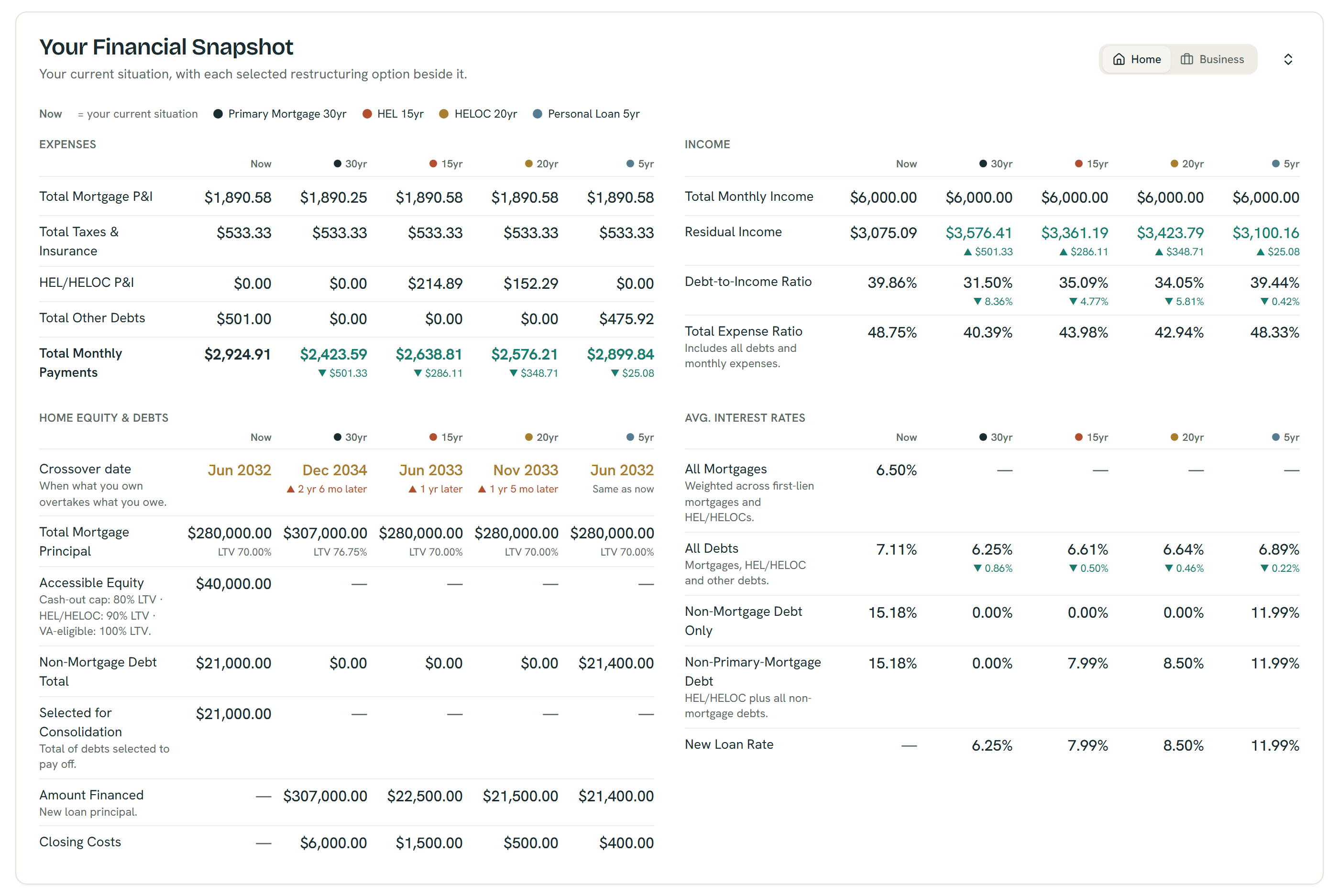
The Financial Snapshot puts every option beside your current numbers — example figures shown; all outputs are estimates, not quotes or offers.
Debt Consolidation Modeling
One of the most powerful things you can do with the ShouldIRefi Calculator is model debt consolidation — specifically, using home equity to pay off higher-interest debt.
If you're carrying credit card balances at 22%+ interest, or a car loan at 8–10%, rolling that debt into a cash-out refinance or home equity loan at a lower mortgage rate can dramatically reduce your total monthly obligations and your total interest paid over time.
The calculator handles this automatically. Enter all of your debts — mortgage, credit cards, auto loans, anything else — and it calculates your current combined monthly payment and total interest across everything. Then it models what happens if those debts are consolidated into a new loan. You can see:
• Whether your total monthly payment goes up or down
• How much interest you'd save over the life of the combined loan
• Your new DTI and LTV after consolidation
• Whether your home's equity is sufficient to cover the payoff
[See your full debt picture →] https://shouldirefi.app/tool/calculator
The Financial Audit: Your Starting Point
Not sure where to start? Not sure what numbers to enter?
[Start with the Financial Audit →] (insert link to /tool/audit)
The Financial Audit is a guided questionnaire that collects your full financial picture — your property details (if you own a home), your mortgage balance and rate, your other debts, your income, and your monthly expenses. When you complete it, everything loads directly into the calculator automatically.
It takes a few minutes. At the end, you have a complete view of your debt, your monthly obligations, your debt-to-income ratio, and the options available to you based on your equity position.
For anyone who isn't sure which numbers go where, the Audit is the fastest path to a complete, accurate picture.
Loan Comparator: When You Have Multiple Offers
If you're actively shopping for a refinance or a new loan, different lenders will give you different offers — and the differences can be harder to compare than they look.
A lower rate might come with higher closing costs. One lender's origination fee might be buried in a different line item than another's. A lender credit on one offer might offset points on another.
The Loan Comparator is a Pro feature that lets you enter multiple loan offers side by side — or upload Loan Estimate PDFs and have the details extracted automatically. You can see:
• Full closing cost breakdowns for each offer
• Net rate after lender credits and points
• Monthly payment and total interest for each option
• Prepayment penalties or balloon payment flags
Once you've identified the best offer, you can send it directly into the main calculator to model the full refinance scenario with real loan terms.
[Compare loan estimates →] (https://shouldirefi.app/tool/loan-comparator)
Saved Scenarios: Come Back When Rates Change
Interest rates move. Your situation changes. A refinance that doesn't make sense today might make sense in six months.
The Saved Scenarios feature lets you save named snapshots of any calculator state — your inputs, your rates, your results — and return to them later. You can build multiple scenarios (refinance now vs. wait, 15-year vs. 30-year, cash-out vs. HELOC) and keep them all stored in your account.
When rates drop or your equity grows, you come back, load the scenario, update one number, and instantly see whether the math has changed.
[Save your scenarios →] (https://shouldirefi.app/tool/scenarios)
For Student Loan Borrowers
ShouldIRefi isn't just for homeowners. If you're carrying federal student loans, the built-in Student Loan Simulator lets you compare all nine federal repayment plans at once — including Income-Based Repayment, PAYE, ICR, and the newer RAP plan.
Enter your loan balance, adjusted gross income, and family size, and the simulator shows you your monthly payment, total interest paid, loan term, and any forgiveness balance under every plan simultaneously. You can also model forbearance and deferment periods to see how pausing payments affects the total cost of your loans.
This runs inside the same calculator, so you can compare a federal repayment plan directly against a private refinance or personal loan payoff scenario on one screen.
The Learn Hub
If you want to understand more about how any of this works before running your numbers — what LTV means, how break-even is calculated, what the difference is between a HELOC and a home equity loan — the Learn Hub at ShouldIRefi.app has a growing library of plain-language guides on every topic covered in the calculator.
[Browse the Learn Hub →] (https://shouldirefi.app/learn)
How to Get Started
Here's the fastest path from "I need an amortization calculator" to a full picture of your options:
1. [Start the Financial Audit] https://shouldirefi.app/tool/audit— enter your mortgage, debts, income, and property details. It loads everything into the calculator automatically.
2. Review your current situation — see your amortization schedule, total interest, DTI, and LTV as they stand today.
3. Toggle on one or more scenarios — refinance, HELOC, personal loan, or self-pay. Compare them side by side.
4. Save your scenario — come back when rates change or when you're ready to move forward.
It's free to start. No credit check. No commitment. Just your numbers, clearly laid out.
[Get started at ShouldIRefi.app →] https://shouldirefi.app/tool/calculator