Getting the most out of ShouldIRefi starts with knowing your numbers. But if you've ever stared at your mortgage statement wondering where the interest rate is hiding — or why your credit card balance barely seems to shrink — you're not alone.
This guide will show you exactly where to find the key numbers on your statements and how to use them in ShouldIRefi's calculator to see your real payoff picture.
Step 1: Log Into Your Lender or Bank's Online Account
Whether you have a mortgage, a credit card, or both, the fastest way to find your statement is to log into your account online.
Almost every bank and lender today has an online portal or a mobile app where your statements are saved as PDFs. Here's where to look:
For your mortgage: Log in to your mortgage servicer's website or app (this is the company you send your payment to — it could be Chase, Wells Fargo, Mr. Cooper, or any number of others). Once you're in, look for a section called something like "Statements," "Documents," or "Account Details." Click on your most recent monthly statement and download the PDF.
If you signed up for paperless billing, your statement only exists online — so this is the only way to get it. If you still get paper statements in the mail, you can use that instead.
For your credit card: Log in to your credit card issuer's website or app. Look for a section labeled "Statements," "Documents," or "Account Activity." Click the most recent monthly statement and download it.
Tip: If you can't find your statement after logging in, look for a "Help" or "FAQ" section on your bank's website, or call the number on the back of your card. They can walk you through it in minutes.
Step 2: Find Your Interest Rate on a Mortgage Statement
Your interest rate is one of the most important numbers you'll enter into ShouldIRefi. Here's where it lives on your mortgage statement:
Look for a section called "Account Information" or "Loan Information." This section usually appears near the top of the statement and includes details like your remaining balance, your loan end date, and your current interest rate.
Your interest rate will be listed as a percentage — for example, 6.75%. If you have a fixed-rate mortgage, this number stays the same every month. If you have an adjustable-rate mortgage (ARM), the rate can change, so always use the rate listed on your most recent statement.
Step 3: Find Your Remaining Loan Term
The remaining term is how much time you have left until your loan is paid off. ShouldIRefi uses this number to calculate your payoff timeline and show you how different strategies could get you there faster. Here's where to find it for each type of loan.
Mortgage:
Look in the "Account Information" or "Loan Information" section of your statement — the same section where you found your interest rate. You'll usually see a maturity date, which is the exact date your final payment is scheduled. To figure out how many months remain, count from today to that date.
For example, if your maturity date is October 2049 and it's currently June 2026, you have about 280 months remaining — or roughly 23 years. That's the number to enter as your remaining term.
Auto Loan:
Your monthly auto loan statement (from your bank, credit union, or lender) also includes a maturity date. Look for it in the "Account Summary" or "Loan Details" section, or check your original loan agreement. Auto loans are typically 24 to 84 months, so the math is usually straightforward: if you started a 60-month loan 18 months ago, you have 42 months remaining.
If you don't see a maturity date on your statement, log into your lender's online account — most show your payoff date right on the account summary screen.
Personal Loan:
Personal loans work the same way. Your statement or online account will list a maturity date or a final payment date. This is the last day a payment is due, assuming you've paid on time. Look in the "Loan Details" or "Account Information" section. Personal loans typically run anywhere from 12 to 84 months, so you may only have a few years left.
If you can't find it on your statement, check your original loan agreement — the term and maturity date are always listed there.
Student Loans:
Student loans are a little different depending on whether they're federal or private.
For federal student loans, log into studentaid.gov with your FSA ID. Your loan details, including repayment plan and estimated payoff date, are all listed there. If you're on a standard 10-year plan and you've been paying for 3 years, you have 7 years (84 months) left. If you're on an income-driven plan, the term may be 20 or 25 years.
For private student loans, log into your loan servicer's website or app and look for the "Loan Details" or "Account Summary" section. Your maturity date or remaining payments will be listed there.
Tip: If you're not sure how many months are left, count the remaining payments shown on your statement. Many lenders include a "payments remaining" line that does the math for you.
Step 4: Find the Numbers on a Credit Card Statement
Credit card statements are laid out a little differently. Here's what to look for:
Your current balance: This is usually at the top of the statement. It's the total amount you owe right now.
Your interest rate (APR): Scroll toward the bottom of the statement and look for a section called "Interest Charge Calculation" or "Account Terms." This section lists your APR (Annual Percentage Rate), which is your interest rate expressed as a yearly percentage. You may see multiple rates listed — one for purchases, one for cash advances. Use the purchase APR when entering your card into ShouldIRefi.
Minimum payment due: This is listed near the top of the statement. It's the smallest amount you can pay without getting hit with a late fee. But paying only the minimum means most of your payment goes to interest — and it can take many years to pay off the balance.
Credit cards do not typically break out a "principal" payment like mortgages do. Instead, whatever you pay above the interest charged each month reduces your balance. The faster you pay it down, the less interest you'll pay overall.
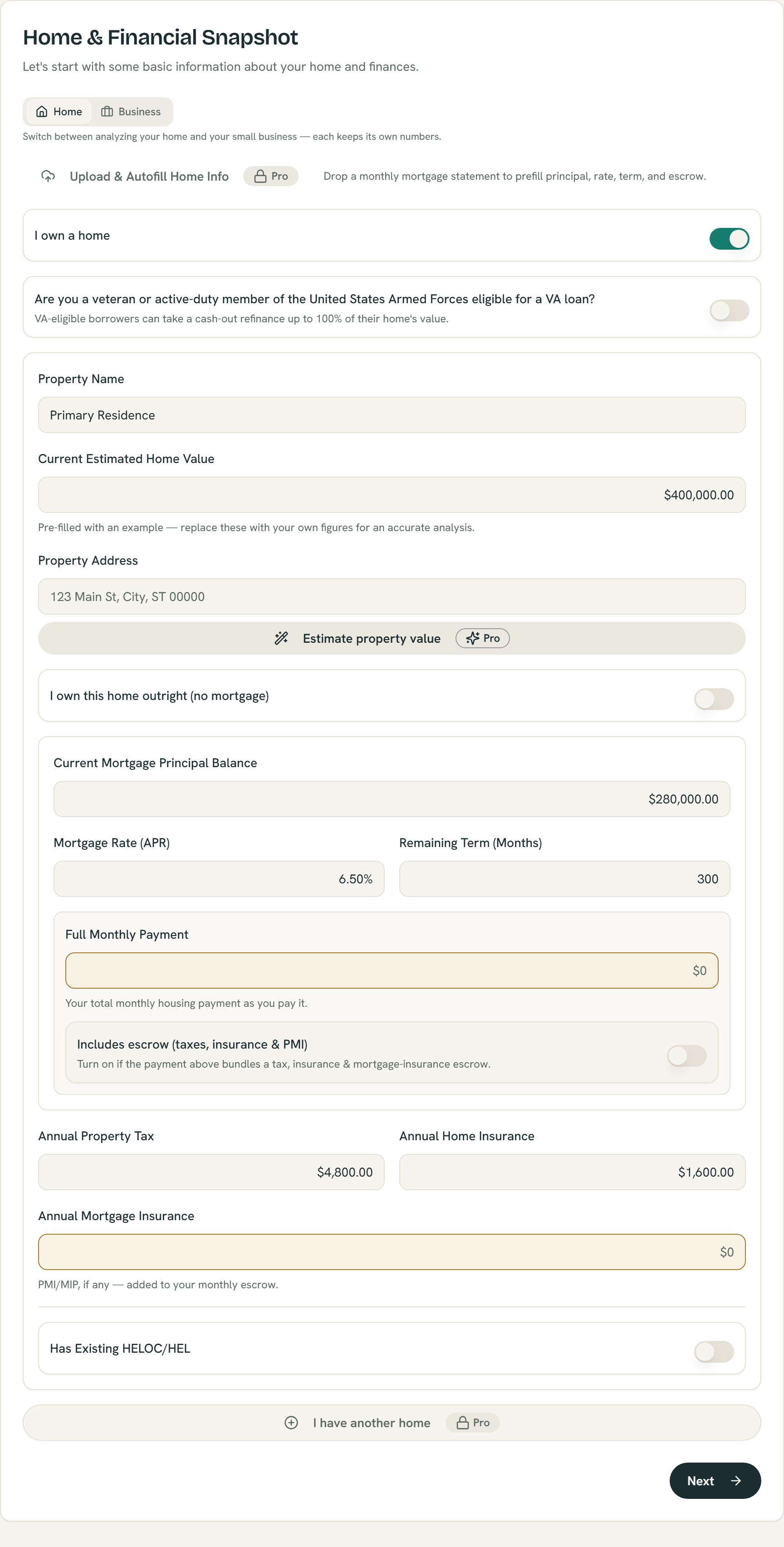
The audit collects each number step by step — every field maps to a line on your statement — and pre-fills the calculator when you finish.
Step 5: Upload Your Statement or Enter Your Numbers in ShouldIRefi
Now that you know where your numbers live, here's how to use them:
Option A — Enter your numbers manually (free for everyone):
Head to ShouldIRefi's Financial Audit for a guided walkthrough that asks you about your debts one step at a time. Or go straight to the Calculator and enter:
- Your mortgage balance and interest rate
- Your remaining loan term
- Your monthly payment
- Any other debts (credit cards, auto loans, student loans) with their balances and APRs
The calculator will immediately show you a comparison of your current path against other options — like paying down debt faster or consolidating balances.
Option B — Upload your statement PDF (Pro feature):
If you'd rather not type anything in, ShouldIRefi Pro lets you upload your mortgage or credit card statement as a PDF directly into the Financial Audit or the inputs section of the Calculator. The app auto-extracts the key numbers from the document — balance, interest rate, payment — so your information is filled in for you automatically.
Note: If you're shopping for a new mortgage and have received Loan Estimates from lenders, those can be uploaded separately into the Loan Comparator to compare offers side by side. That's a different tool for a different step — comparing new loan offers, not entering your current debts.
What ShouldIRefi Does With These Numbers
Once your numbers are in, ShouldIRefi gets to work. Depending on your situation, it can show you:
- How much interest you'll pay over the life of your loans — this number is often shocking
- What a lower interest rate would save you — modeled across different refinance or loan options
- How much faster you could pay off your debt with extra monthly payments
- Whether consolidating your debts into a personal loan or home equity loan makes sense
- A side-by-side comparison of up to four different strategies at once
All of this starts with the numbers on your statement. Knowing your interest rate and how your payment breaks down puts you in control of your financial picture — instead of just paying a bill each month without knowing where the money really goes.
Quick Reference: Where to Find Key Numbers
| What You Need | Where to Find It |
|---|---|
| Mortgage interest rate | "Account Information" or "Loan Information" section of your statement |
| Remaining mortgage balance | "Account Information" or top summary section |
| Remaining mortgage term | Maturity date in "Account Information" — count months from today to that date |
| Auto loan remaining term | "Account Summary" or "Loan Details" on your statement or online account |
| Personal loan remaining term | "Loan Details" or "Account Information" on your statement or original loan agreement |
| Federal student loan remaining term | Log into studentaid.gov — payoff date is listed under your loan details |
| Private student loan remaining term | "Loan Details" or "Account Summary" on your servicer's website or app |
| Credit card interest rate (APR) | "Interest Charge Calculation" section near the bottom of the statement |
| Credit card balance | Top of the statement or account summary section |
Ready to See Your Full Picture?
Once you have your numbers, start with the Financial Audit for a step-by-step walkthrough, or jump straight into the Calculator to start comparing your options. If you've received loan estimates from lenders, try the Loan Comparator to see which offer saves you the most.
Your statement has everything you need. Now you know where to look.