One of the biggest mistakes people make when researching refinancing or debt payoff options is treating it as a one-time decision.
They run the numbers once, decide nothing looks good right now, and forget about it for years.
The problem: interest rates change. Home values change. Your income and debts change. What didn't make sense six months ago might be a clear win today — or vice versa.
The way to stay on top of this without constantly starting over from scratch is to save your scenarios.
What Is a Saved Scenario?
A scenario is a snapshot of your financial picture paired with a specific strategy you're modeling. For example:
- "What if I do a cash-out refinance at today's rates?"
- "What if I wait 6 months and rates drop?"
- "What if I use a HELOC instead of refinancing?"
- "What if I just make extra payments?"
Each scenario captures your current inputs — home value, mortgage balance, debts, income — and a specific set of loan terms you're considering. The outputs (monthly savings, break-even, total interest, equity growth) are frozen at the moment you save it.
When you come back later, you can load the old scenario, update the numbers, and see instantly how the decision has changed.
Why Saving Scenarios Matters
Reason 1: Rates are unpredictable.
Mortgage rates move frequently. What looked like a poor refinance when rates were high could become a great deal after even a modest drop. If you've already done the work of entering your numbers, a saved scenario means you can revisit it in minutes rather than starting over.
Reason 2: Your situation changes too.
Your home may have appreciated. You might have paid down debt. You might have gotten a raise. All of these shift what's available to you and what the math says. Updating a saved scenario to reflect your new reality is much faster than building from scratch.
Reason 3: Side-by-side comparison over time.
Sometimes the most useful thing isn't comparing Option A vs. Option B right now. It's comparing "what would have happened if I refinanced 6 months ago" vs. "what refinancing looks like today." Saved scenarios let you build that kind of institutional memory around your own finances.
Reason 4: You can share decisions with a partner or advisor.
If you're making financial decisions with a partner, or working with a financial advisor or mortgage broker, saved scenarios give everyone a common reference point. Rather than explaining everything from memory, you can pull up exactly what you were considering and why.
Common Scenarios Worth Saving
"Current situation baseline" Your existing debts, rates, and monthly payments with no changes. Every comparison starts here.
"What if I refi now?" Model current market rates and your estimated closing costs. This is your starting point for any refinance analysis.
"Wait and see" The same refinance but with a hypothetical rate 0.5–1% lower. If rates drop to that range, you want to know immediately what the deal looks like.
"Cash-out to pay off debt" Model pulling out equity to consolidate debts. Compare it to your baseline and the rate-and-term refi.
"HELOC vs. cash-out" Two separate scenarios so you can see the tradeoffs side by side.
"Self-pay with extra $500/month" Model accelerated paydown without any new financing to see how it compares.
When to Come Back and Update
A few natural triggers to revisit your saved scenarios:
- Rates move. If mortgage rates drop meaningfully, check your saved "what if I refi" scenario.
- Home values change. A significant rise in your neighborhood's prices may unlock more equity.
- You pay off a debt. A completed auto loan or credit card payoff changes your DTI and your monthly cash flow.
- Income changes. A raise or job change changes what you can afford and what lenders will approve.
- You're approaching a major decision. Planning to move, buy a rental, or send a kid to college? Update your scenarios before that happens.
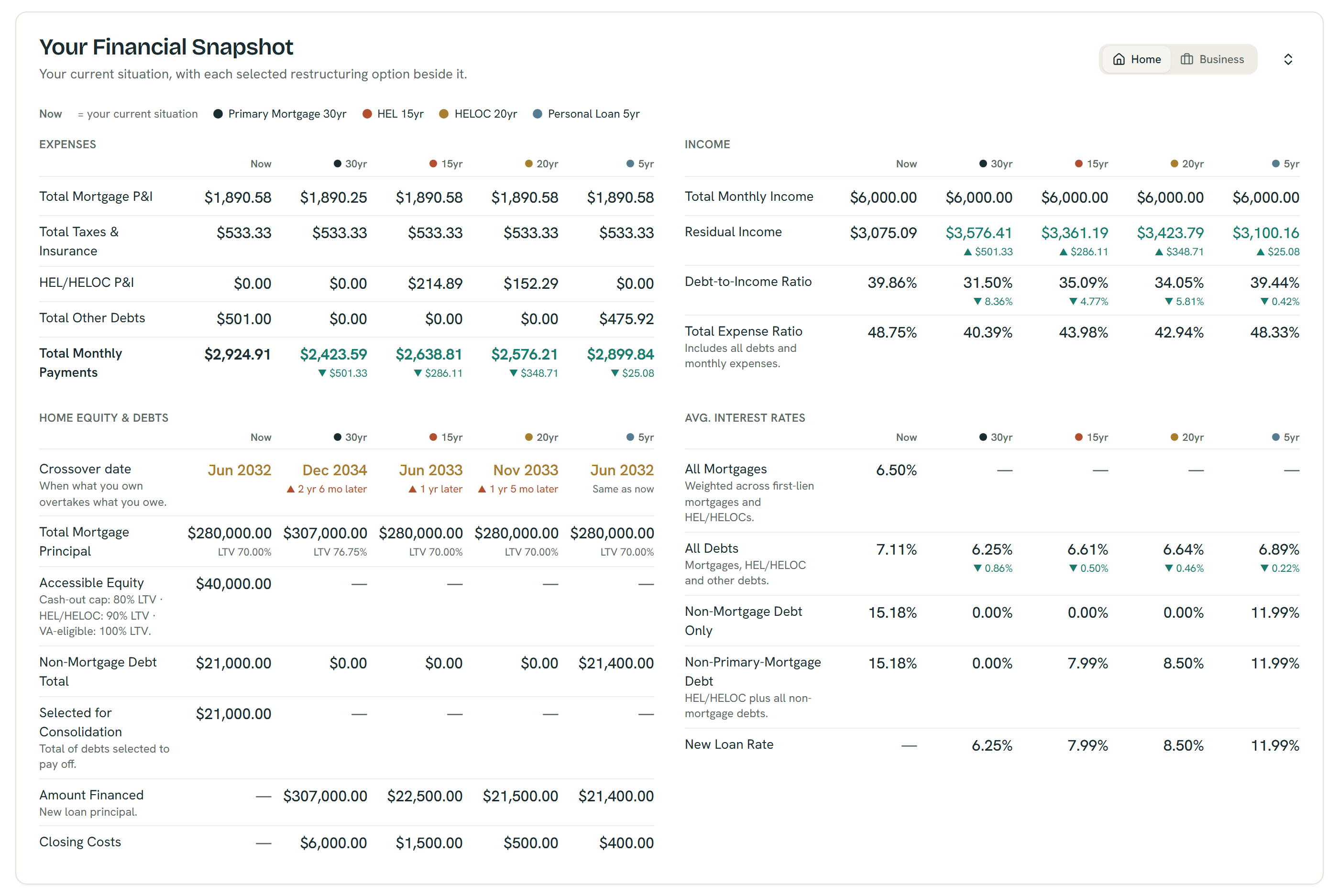
The Financial Snapshot puts every option beside your current numbers — example figures shown; all outputs are estimates, not quotes or offers.
Try It Yourself
Create a free account at ShouldIRefi → (https://shouldirefi.app/pro)
The Saved Scenarios feature lets you save named snapshots of your calculator states — rates, inputs, and results — all tied to your account. Load them back at any time, compare two scenarios side by side, or duplicate a scenario to tweak specific assumptions.
It's one of the most underused features of the app, and it's available to all signed-in users for free.
Here's how to start:
- Take the Financial Audit (https://shouldirefi.app/tool/audit) to load your full financial picture into the calculator
- Model your first scenario (current situation vs. a refinance option)
- Save it with a name like "Cash-out refi, June 2026 rates"
- Come back when rates change or your situation changes and compare
Go to Saved Scenarios → (https://shouldirefi.app/tool/scenarios)